 Twitter
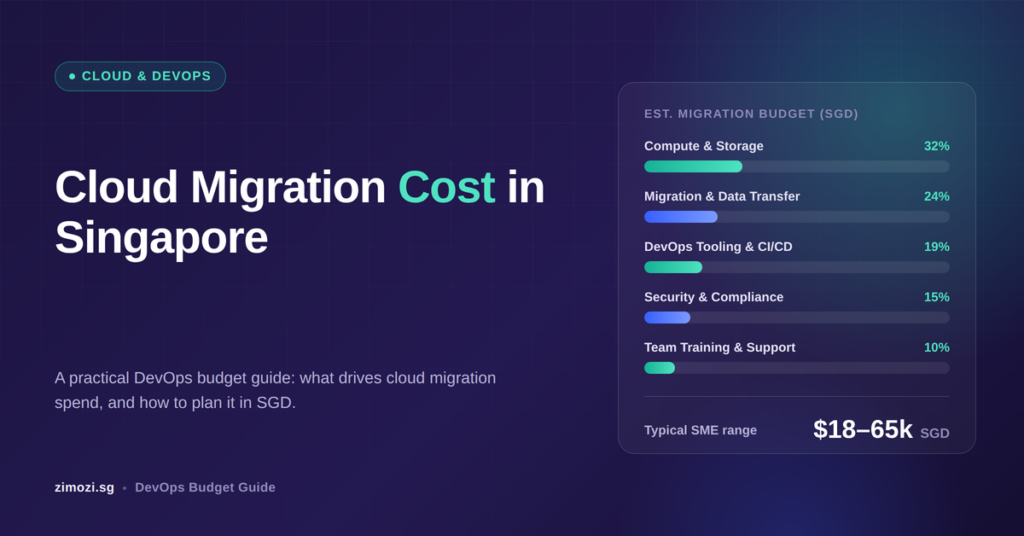
Cloud migration cost in Singapore includes more than the price of hosting an application. Your budget needs to cover preparing the software, moving its data, testing the new environment and keeping it running after the move.
Cloud migration means moving an existing application or system to cloud infrastructure. DevOps brings together the processes used to build, release and maintain that software. Planning both together helps you account for how the application will operate after launch.
For Singapore SMEs, startup founders and technology managers, a useful estimate should answer three questions: what will the move cost, what will the monthly expenses include, and who will manage the system afterwards?
Why cloud migration budgets are hard to compare
Two proposals for the same application can include very different work. One may cover moving the application and database. Another may also include automated releases, security configuration, recovery testing and support.
Before comparing prices, check whether each proposal includes:
- Reviewing the existing application and its connected systems.
- Making changes needed for the new environment.
- Moving and checking data.
- Testing business workflows before launch.
- Setting up backups, monitoring and access controls.
- Documenting the system and handing it over.
AWS recommends assessing current infrastructure usage and application dependencies before estimating migration costs. This helps establish what needs to move and what it needs to keep working.
A clear scope makes cloud migration cost in Singapore easier to assess. It also helps explain why a lower quote may leave more work with your internal team.
What a complete migration plan should include
A migration plan should explain how the application will move, how the team will check it and how it will be supported.
DevOps is part of this planning. For example, a deployment pipeline is an automated sequence that checks and releases software changes. Setting it up gives the team a repeatable way to update the application after migration.
A practical plan should:
- Define which applications, databases and files are moving.
- Identify integrations that must continue working.
- Explain how releases and configuration changes will be managed.
- Set permissions for developers, administrators and support staff.
- Include backup checks and a tested recovery process.
- Define acceptable downtime and a rollback plan.
- Assign responsibility for monitoring, maintenance and spending.
A rollback plan explains how to return to the previous system if the move cannot be completed safely. Agree on who can make that decision before the final switch.
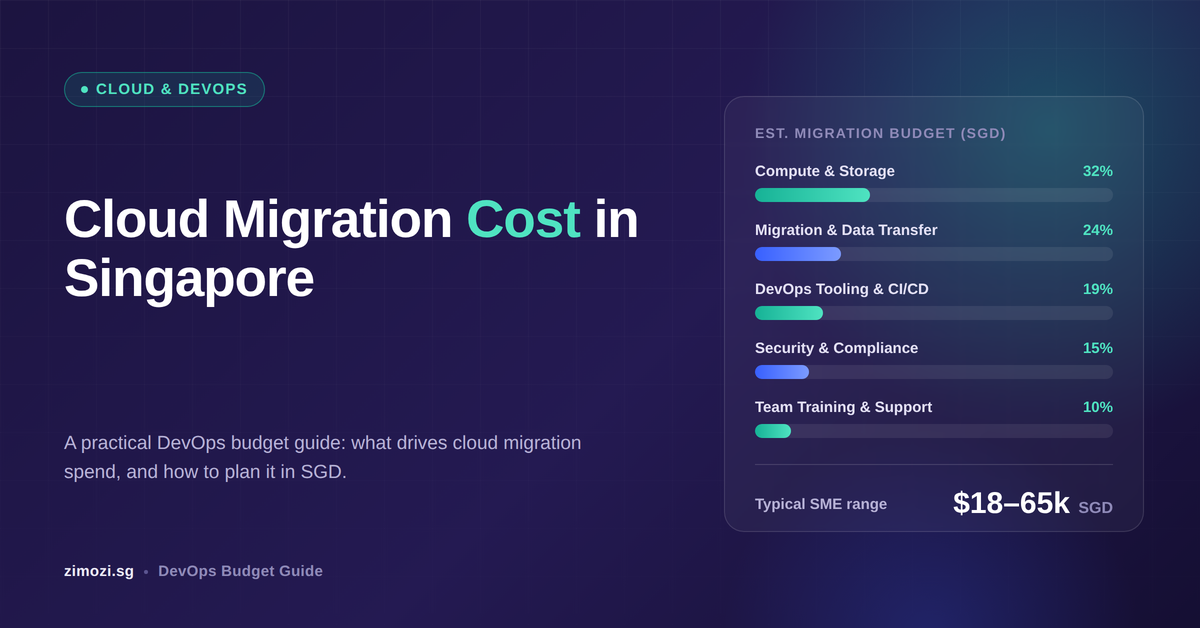
What affects cloud migration cost in Singapore?
Assessment and application changes
The first task is to understand the current system. This includes its software, database, connected services and resource usage.
Some applications need limited changes. Others may rely on unsupported software or settings that must be updated before moving.
Ask the team to separate essential migration work from optional improvements. This makes it easier to decide what belongs in the first phase.
Data movement and testing
Moving data includes checking that it arrives correctly and remains usable.
A customer portal, for example, may contain account records, uploaded documents and transaction history. The team needs to confirm that these remain connected and accessible after the move.
If records continue changing during migration, the plan must explain how the final updates will be transferred. Include time for staff to test the business workflows they know best.
DevOps setup and security
DevOps setup can include automated testing, deployment steps, infrastructure configuration and monitoring.
Infrastructure as code means describing the cloud environment in configuration files. The team can review these files and use them to recreate the setup when needed.
Confirm whether the estimate includes writing tests or only running existing ones. Also check how passwords and other secrets will be managed, who receives administrator access and who responds to alerts.
Monthly cloud services
Recurring expenses can include computing resources, databases, file storage, backups, networking and monitoring.
When estimating cloud migration cost in Singapore, use the proposed architecture and expected usage to calculate recurring charges. The AWS Pricing Calculator, Azure Pricing Calculator and Google Cloud Pricing Calculator can help estimate provider costs.
These estimates do not replace a separate quote for migration work or ongoing engineering support.
For a Singapore budget, confirm the billing currency, exchange-rate assumptions and whether applicable taxes are included.
Transition and ongoing support
There may be a period when the old and new environments both need to run. Budget for this overlap and agree on the conditions for retiring the old system.
After launch, someone still needs to review alerts, apply updates, check backups and investigate unexpected spending.
Define what support includes. Monitoring an application and responding to an incident are separate responsibilities, even when the same provider handles both.
Why a migration estimate can miss the final cost
An estimate for cloud migration cost in Singapore becomes less useful when important assumptions remain unclear.
The application may need more changes than expected. A connected service may require additional testing. The business may also add new features while migration is underway.
A more dependable estimate should state:
- Which application changes are included.
- How much data will move and how it will be checked.
- What traffic and storage assumptions support the monthly forecast.
- How long both environments are expected to run.
- What support is included after launch.
- How additional work will be reviewed and approved.
Moving to the cloud does not guarantee lower costs. Resource sizes and spending need attention during and after migration. AWS guidance recommends monitoring migration expenses and adjusting resources to actual needs.
Compare the full cost of operating the application, including staff time, licences and maintenance.
A realistic first step
Start with one application whose purpose and dependencies are clear. This is how to keep cloud migration cost in Singapore predictable from the first phase.
Consider a hypothetical Singapore SME moving a customer portal. It has a web application, a database, uploaded documents and an accounting integration. The business can accept a planned maintenance window and wants to keep the current features.
The first phase could cover setting up a test environment, copying the data, checking the accounting connection and testing essential customer tasks. These might include signing in, viewing records and downloading documents.
Before the final move, confirm that the team can restore a backup, release an update and follow the rollback procedure. Assign an owner for each check.
To estimate your first-year cloud migration cost in Singapore, build the budget around that defined scope:
First-year budget = migration work + DevOps setup + transition expenses + 12 months of expected running costs + an allowance for identified uncertainties.
Ask for an expected-use forecast and a higher-use scenario. This shows how costs could change if traffic or storage grows.
The example above is a planning illustration, not a customer project or a price quotation.
Frequently Asked Questions
How much does cloud migration cost in Singapore?
The price depends on the application, data, integrations and changes required. Ask for an itemised estimate covering the migration, DevOps setup and monthly running costs. A hosting price alone does not show the full project cost.
Are DevOps costs included in cloud migration?
They may be, but every proposal is different. Check whether automated releases, testing, monitoring, backups and handover are included. Ongoing support may be priced separately.
Will moving to the cloud save money?
It may, but savings are not guaranteed. Compare your current expenses with the full cost of the proposed environment, including migration, maintenance and support.
Will we need to rebuild the application?
Not always. Some applications can move with small changes. Others need updates before they can run reliably in the new environment. An initial assessment should explain what is necessary.
How does Zimozi help?
Zimozi provides DevOps and automation services, including deployment pipelines, infrastructure as code and monitoring. These capabilities can support the way an application is released and maintained as part of a cloud migration project.
Where Zimozi fits in
Zimozi’s DevOps and automation services cover automated deployment, infrastructure configuration and monitoring.
For a business moving an existing web application or SaaS product, these capabilities can support a repeatable release process and clearer operational responsibilities. The scope should reflect the application, the team’s existing skills and the level of support required.
A useful starting conversation is about one application: how it works today, what needs to move and who will maintain it afterwards.
Ready to plan your migration?
Understanding cloud migration cost in Singapore starts with clear initial expenses, monthly charges and support responsibilities. Start with a defined application and an estimate that explains its assumptions.
Not sure what your cloud migration will actually cost? Book a free call with Zimozi. We will help you scope the application, estimate the DevOps setup, and give you a clear cost breakdown before you commit.